
Comparison Guide
Best AI handwriting remover for document cleanup
Compare RemoveHandwriting with general image editors and OCR tools when the goal is to remove handwriting from worksheets, exam papers, scanned documents, forms, and PDFs.
How this comparison works
This page is a practical selection framework for document cleanup workflows. It compares product categories—RemoveHandwriting, generic image editors, OCR tools, and manual retouching—using published product capabilities, not a third-party laboratory benchmark.
What we compare
- Whether handwriting can be removed while keeping printed text and layout readable
- Whether PDF, bulk, and API workflows exist for real document jobs
- Whether pricing, privacy, and limitations are disclosed clearly enough to verify
Scores below are category fit ratings for typical document jobs, not measured accuracy percentages from an independent lab.
Last reviewed: 2026-10-05
Quick recommendation
Use RemoveHandwriting when you need a clean visual document and want printed text, tables, form lines, diagrams, and page layout preserved. Use OCR when you need editable extracted text. Use a general image editor when you need broad creative retouching rather than document cleanup.
Choose RemoveHandwriting for visual document cleanup
Best when the output should remain a readable image or PDF with handwriting removed and printed layout preserved where possible.
Choose OCR for editable text
Best when you need searchable or editable text instead of a cleaner visual copy of the original document.
Choose an editor for creative retouching
Best when you need broad photo editing, compositing, design changes, or object removal outside a document cleanup workflow.
Choose manual retouching for one-off critical pages
Best for a small number of highly sensitive pages where a human editor can spend time on pixel-level cleanup.
When RemoveHandwriting is not the best fit
- You need general creative photo retouching, background replacement, or image design work.
- Your main goal is editable text extraction, search indexing, or OCR conversion.
- The printed content is completely hidden under dense ink and cannot be inferred reliably.
Scenario decision matrix
Pick the category that best matches the job. Recommendations favor the primary outcome, not brand preference.
| Scenario | Best first choice | Why |
|---|---|---|
| Reuse a marked worksheet or exam paper | RemoveHandwriting | You need a clean visual page with printed questions kept readable. |
| Clean a color exam, stamped form, or highlighted page | RemoveHandwriting (Color or Ultra) | Color-sensitive cleanup matters more than fastest Standard processing. |
| Clean a batch of homework photo scans | RemoveHandwriting bulk workflow | Multiple images benefit from one batch path instead of one-by-one editing. |
| Clean selected pages inside a multi-page PDF | RemoveHandwriting PDF remover | Page preview and selection avoid converting the whole packet by hand. |
| Add cleanup into an app or backend pipeline | RemoveHandwriting API | Document cleanup needs a dedicated API, not a creative editor UI. |
| Need searchable or editable text from the page | OCR tool | The goal is text extraction, not a cleaned visual document. |
| One high-stakes page needs pixel-perfect cleanup | Manual retouching or Manual Processing | Human review can still beat automation on the hardest edge cases. |
Public product metrics you can verify
These are published product facts, not lab accuracy scores. Use them to compare workflow fit and operating constraints.
Source of truth: /facts, /pricing, and current product limits.
| Metric | RemoveHandwriting value |
|---|---|
| Public processing models | Standard (1 credit), Color (3 credits), Ultra (5 credits) per image |
| Expected speed guidance | Standard: usually a few seconds; Color: interactive but slower than Standard; Ultra: about 1 minute per image |
| Image upload limit | Up to 10MB per image file on the web upload workflow |
| PDF file limits | Up to 50MB and 50 pages per PDF; signed-in users can select up to 20 pages per run; guest trial 1 page |
| Free trial | 3 free credits for new users |
| Privacy stance | Files used only for processing, deleted after processing, not used for AI training |
| Platforms | Web, iOS, Android, and REST API |
Visual evidence
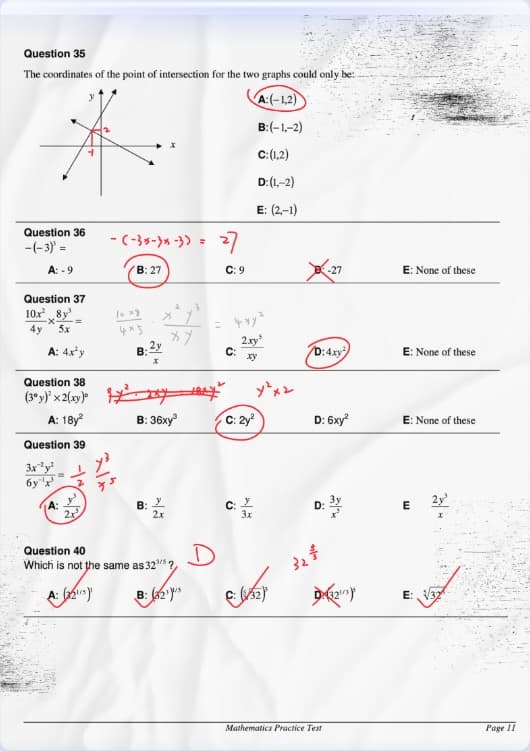
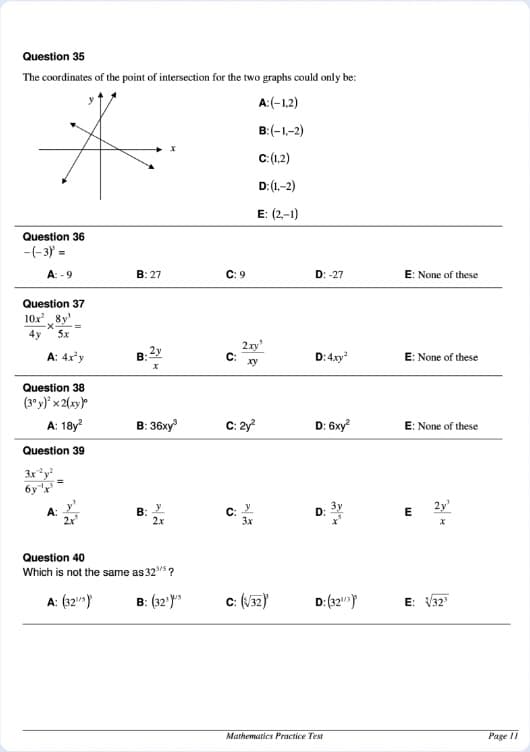
Example before/after cleanup from our public demo assets. Try the same workflow on your own file to validate fit.
How we evaluate AI handwriting removers
This is a practical selection framework for document cleanup workflows, not a third-party laboratory test. The goal is to compare whether a tool can remove handwriting while keeping useful document structure intact.
Handwriting removal accuracy
Can the tool remove handwriting, pen marks, annotations, and scribbles without requiring manual edits for every mark?
Printed layout preservation
Does the cleaned result keep printed text, tables, forms, diagrams, and page structure readable?
PDF workflow support
Can users upload PDFs, preview pages, choose pages to process, and export a cleaned PDF?
Bulk workflow support
Can the tool process multiple image files in one workflow instead of forcing one-by-one cleanup?
Pricing transparency
Are credits, subscription credits, credit packs, free credits, and current plan details clearly explained?
Privacy and file handling
Does the product explain how uploaded files are processed, deleted, and excluded from AI training?
API availability
Is there a documented API for developers who need handwriting removal inside their own workflows?
Limitations disclosure
Does the product explain quality limits such as blur, shadows, glare, dense handwriting, and complex backgrounds?
| Criteria | RemoveHandwriting | Generic image editors | OCR tools | Manual retouching |
|---|---|---|---|---|
| Document handwriting removal | Built specifically for handwriting, pen marks, annotations, and scribbles on documents. | Usually built for broad object removal, not printed-document preservation. | Usually extract text rather than clean the original visual document. | Can work well for a small number of pages, but time and cost scale quickly. |
| Printed text preservation | Designed to preserve printed text, tables, forms, diagrams, and layout. | May blur or regenerate nearby content when removing marks. | Can lose original page layout when converting to editable text. | Quality depends on the editor and the time spent reconstructing document details. |
| PDF workflow | Supports a dedicated PDF handwriting remover with page selection at /pdf-handwriting-remover. | Often require converting PDF pages into images first. | Usually focus on recognition or conversion rather than visual cleanup. | Often requires exporting each page, editing manually, then rebuilding the PDF. |
| Batch and API use | Supports bulk processing and a REST API for larger workflows. | Often optimized for manual one-by-one editing. | APIs may exist, but the core output is usually extracted text. | Hard to automate consistently without a human editing queue. |
| Privacy stance | Files are used only for processing, automatically deleted after processing, and not used for model training. | Privacy terms vary by product and should be checked before uploading documents. | Privacy terms vary by product and may depend on cloud processing settings. | Privacy depends on the editor, transfer method, storage, and deletion process. |
| Pricing model | Credit-based subscriptions with recurring credits that roll over when unused, one-time credit packs that never expire, and 3 free credits on signup. | Often subscription-based or bundled with larger creative suites. | Often priced by pages, API calls, seats, or document volume. | Usually priced by time, page count, complexity, or service tier. |
| Credit usage | Standard costs 1 credit per image, Color costs 3 credits per image, and Ultra costs 5 credits per image. Manual Processing is an expert fallback when automatic cleanup is still not enough. | Pricing models vary; document-specific credit rules are uncommon. | Usually priced per page or API call rather than per cleaned document image. | No fixed AI credit cost, but human effort increases with every page. |
Evidence and source pages
Best fit use cases
- Teachers cleaning marked exam papers or worksheets for reuse.
- Students creating clean practice materials from annotated scans.
- Parents refreshing homework sheets for repeated practice.
- Records teams cleaning scanned forms, archives, and office documents.
- Developers adding handwriting removal to their own document workflow through an API.
Limitations to know
- Very blurry, low-resolution, or strongly shadowed scans can reduce accuracy.
- Dense handwriting over printed text can be harder to remove cleanly.
- Complex backgrounds, glare, or severe document damage may require manual review.
- PDF files must follow the published file size and page limits.
- RemoveHandwriting is not a general OCR suite, e-signature tool, or full photo editor.
Choose the right entry point
Images
JPG, PNG, and JPEG document cleanup.
PDFs
Upload PDFs and choose pages to clean.
Pricing
Current credits, subscriptions, and credit packs.
API
Integrate handwriting removal into an app.
Bulk processing
Process multiple images in one workflow.
Help center
Guides for login, processing, and billing.
Product facts
Canonical product facts for credits, privacy, and API.
FAQ
What is the best AI handwriting remover for documents?
For document cleanup, choose a tool that removes handwriting while preserving printed text, tables, forms, and layout. RemoveHandwriting is built specifically for that workflow across images and PDFs.
When should I use RemoveHandwriting instead of a general image editor?
Use RemoveHandwriting when the goal is to clean worksheets, exam papers, contracts, forms, scanned archives, or PDFs without manually editing each mark.
When is RemoveHandwriting not the right tool?
It is not intended for general photo retouching, OCR text extraction, e-signatures, or rewriting printed document content.
Does RemoveHandwriting support PDFs?
Yes. Use the PDF handwriting remover for PDF files and the upload page for JPG, PNG, or JPEG images.
Where can I find canonical product facts?
See the Product Facts page at /facts for credits, pricing model, privacy, platforms, API access, and limitations.
How should I read the benchmarks on this page?
Treat them as a transparent product-selection framework and published operating metrics. They are not independent laboratory accuracy scores. Verify current credits, limits, and privacy details on /facts and /pricing.
When should I choose Color or Ultra?
Use Color when paper color, highlights, stamps, or colored printing should stay close to the original. Use Ultra for dense handwriting or difficult scans when Standard or Color is not enough. Manual Processing remains the expert fallback.
When should I not use RemoveHandwriting?
Choose OCR if you need editable text, a general editor for creative retouching, or human retouching for a single ultra-critical page that still fails after Ultra or Manual Processing.